more information

Pages

Thursday, April 14, 2011

WINDOWS MOVIE MAKER ( from Chapter 4)

' W!nDowS m0v!3 MaKer '

 Do u know what is ' Windows Movie Maker' ???
haha..i have very very like tis specialized application software~~~! it let me know how to create a video by myself~ i can add what song, pictures that i like~

( from : google image )

( from: google image )


( from: google images )

Feel INTERESTING...?????
haha~ just install this software now~~!!
Oppssss.......don't know how to install..??
actually it is SIMPLE & EASY~~
write down the notes and step for you..?? Oh My GOD~~so outdate~~
we are study TECHNOLOGY~should be good use of technology~~^^
i m SHOWing you now ~

' HOW TO INSTALL Windows Movie Makers in your PC~~ '


easy right.??? then just do it now!!!!

SESI LUAH PERASAAN

Apa y telah kami faham dalam sesi pembelajaran dalam sem 2 untuk subjek ini banyak nak diceritakan sebenarnya.Kalau mahu ditulis semuanya,adoi..jenuh korang nk membacenyer.Jadi kami ringkaskan apa y telah kami faham dan ingat dalam subjek ini

berikut adalah senaraiapa y saya dapat:
-inilah kali pertama kenal blog dah saya berusaha untuk belajar menggunakan ia kerana sebelum ini tidak terdedah pada benda alah ni.
-teknologi & manusia ,ia berkisar tentang cynicism,naivetc,frustration & proaktif.
-tahu tntg program dan programming ,mempunyai 6 lngkah penting.
-tahu tentang sistem analisis.
-dapat tahu tntg database,ada 5 model database iaitu hierachical,network,relational,multidimensional dan object oriented.
-sistem perisian seperti windows,mac os,unix dan linux.
-kat sini saya boleh kenal virus2 yang terkemuka dalam dunia ni dan tahu cara nak menghalang atau mencegahnya.
-tahu kelengkapan komputer atau laptop dengan lebih mendalam dan jelas
-tahu stuktur URL contohnya domain name,nama server dimana sumbernya terletak.
-tahu tntg hybrid network iaitu gabungan antara topologies yang berlainan.


Kpd guruku:terima kasih mengajar kami,PN SHARIN HAZLIN HUSPI..kami sudah tidak buta it lagi setelah sesi pembelajaran ini...
TERIMA KASEH BANYAK2


sekian terima kasih..

Wednesday, April 6, 2011

Step 6 :
Program maintenance


(Step 6: Program maintenance)


< Program maintenance >

is designed to ensure that
the program operates
correctly,
efficiently,
and effectively
Two categories of maintenance activities are the following:


1.  Operation.
2.  Changing needs.


Operation.

Operation activities concern on
locating
and 
correcting operational errors,
making program easier to use,
and 
standardizing software
using structured programming techniques. 
For properly designed programs,
these activities should be minimal


Changing needs.

Organizations change over time
and
their problems must change with them. 
Agile development starts with core program functionality
then,
expands until customer is satisfied with results.


(Maintenance programmer)


Step 5:
Program documentation.


(Program documentation)


< Program documentation >
 
Consists of a written description
of the program
and
the procedures for running it. 
People who used
documentation include,....


1.  Users.
  Need to know how to use the program.
Some organizations offer training courses;
other expect users to learn
from written documentation.
2.  Operators
  Need to know how
to execute the program
and
how to recognize and correct errors.
3.   Programmers.
 
  May need to
update
and 
maintain the program  in the future.
Documentation could include 
text and program flowcharts, 
program listings
and
sample outputs.


(An ongoing process of documentation)


 Testing process


(Testing process)


5 methods
to test for
syntax and logic error....


 1.  Desk checking (code review)

 Process of checking out
a computer program
by studying a print out
of the program line-by-line,
looking for 
syntax and logic errors.


2.  Manual testing

Using a calculator
and
sample data
to test for correct programming logic 


3.  Attempt at translation

Running the program
using a translator program
to identify syntax errors. 


4.  Testing sample data

Running the program
and 
testing the program 
for logic errors 
using sample data 


5. Testing by users (beta testing)

Testing by a select group 
of potential users
in the final stage of
testing a program.
(Example of syntax error identified)


 Step 4 :
Program test


Debugging is
a process of
testing and eliminating errors in a program.

Syntax
&
logic

are two types of programming errors.


Syntax errors.

Violence of
the rules of a programmiing.

For example,
omitting a semicolon
at the end of C++ statement.


(Other example of syntax error)


Logic errors.

Incorrect calculations
or
procedures.

For example,
failure to include calculation
of overtime hours 
in a payroll program.


(Other example of logic error)


Step 2:
Program Design


 In program design, 
a solution is
designed using,
preferably, 
structured programming techniques, including these following:


Top-Down Program Design.

- Major processing steps called program modules are identifiers.


(Examples of top-down design)


Pseudocode.

- An outline of the logic of the program that will write.


Example of pseudocode


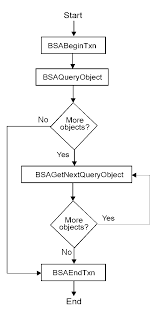
Flowcharts

- Graphic representations of the steps necessary to solve a programming problem.
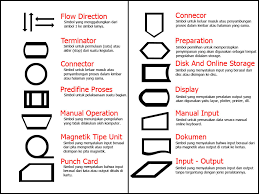

(Flowchart symbols)
 

(Example of flowchart)

(Example of flowchart)

(Example of flowchart)


Logic structures

-Arrangements of the programming statements. there are 3 types, those are:

  • Concatenation
One program statement followed by other.


(Examples of concatenation logic structure.)


  • Selection (IF-THEN-ELSE) 
When a decision must be made.
Logical selection structure whereby
one of two paths
is followed according to IF,
THEN, 
and ELSE
statements in a program. 
See Selection structureS.


  • Repetition (loop) (DO UNTIL and DO WHILE)
When a process is repeated until condition is true. 


DO UNTIL

- Loop structure in programming that appears
at the end of a loop.

-The DO UNTIL loop means that 
the loop statements
will be executed at least once.

-In other words, 
this program tells you
to DO option one UNTIL it is no longer true.  


DO WHILE 

- Loop structure in programming 
that appears at the end of a loop. 

-The DO UNTIL loop means that 
the loop statements
will be executed at least once.

-In other words, this program
tells you
to DO option one UNTIL it is no longer true.