more information

Pages

Wednesday, March 23, 2011

DATABASE MANAGEMENT(DBMS)


A database management system is actually a kind of a software..
It is use for creating, modifying and gaining access to the database..
It is popular with a short form DBMS..


DBMS consist of 5 subsystem..

  1. DBSM engine
  2. Data definition subsystem
  3. Data manipulation subsystem
  4. Application generation subsystem
  5. Data administration subsystem


NEED FOR DATABASES..


There are many advantages in having databases..


1st, sharing information..
Information from one department can be readily shared with others..
In example, your id/matric card number..
In the cip, there are stored information and background about you.
The card is use in order to when need to be used such as when you want to enter a library..


2nd, for a security..
Users are given passwords/access only to the kind of information they need..
Thus, only the related department may have access to those information..other department may not..


3rd, less data redundancy..
Without a common database, individual department have to create and maintain their own data and data redundancy..
What is the data redundancy??

It is a common database problem in which data is duplicated and stored in different files.


4th, for the data integrity.. 
It is a database characteristics relating to the consistency and accuracy of data.


BATCH processing is.. 

A processing performed all at once on data that have been collected over time.

In a batch processing group of transactions collected over a period of time is collected, entered, processed and then the batch results are produced. 

Batch processing requires seperate programs for input, process and output. 


Batch processing..


(Batch Credit Cards)


It is an efficient way of processing high volume of data.
For example: Payroll system, Examination system and billing system.

But, instead of that...
I'm showing you about this..


Meanwhile,
REAL-TIME processing is..

online processing, resulting when data is processed at the same time a transaction occurs.

In a real time processing, there is a continual input, process and output of data.


Data has to be processed in a small stipulated time period (real time), otherwise it will create problems for the system.
For example: assembly the traffic lights.


HOW DATA BEING ORGANIZED??

In this world, there are billions of data presented..
With many of them, how can human classified and organized them??

To be easy, 
data is organized by the following groups :
  • character
  • field
  • record
  • table
  • database


1. Character the most basic element.
A single letter, number, or special character, such as a punctuation mark or $. 
 
2. Field - a set of related characters
Each column of information within a record is called a field.
A field contains related information on a specific item like employee names within a company department.
 

 3. Record - a collection of related field

Each row of information in a database is a record.
Each record contains fields of data about some specific item, like employee name, address and phone, etc. 
A record represents a collection of attributes describing an entity.

4. Table - a collection of related table


5. Database - an integrated collection of related tables
 A collection of related information, like employee names, addresses and phone numbers.
It is organized in a way that a computer program can quickly select the desired pieces of information and display them for you.


KEYFIELD..

What is Keyfield?? 

Keyfield is the common field by which tables in a database are related to each other. 
This field uniquely identifies the record. 
For example in university databases, a key field is the social security number. 
Also known as Primary field or Primary key.


Tuesday, March 22, 2011

Database

anything that is collected information and organized is called Database. it can be easily to accessed, managed and update. database can be classified into types of bibliography, full text, numeric and images.


Computer database typically collection of data records or files, likes, sales transaction, inventories, product catalogue, and customers record or employees profiles.


www.wispals.org/subscriptions.php
Typically, a database manager provides users the capabilities of controlling read/write access, specifying report generation, and analyzing usage. Databases and database managers are prevalent in large mainframesystems, but are also present in smaller distributed workstation and mid-range systems such as the AS/400 and on personal computers. SQL (Structured Query Language) is a standard language for making interactive queries from and updating a database such as IBM's DB2, Microsoft's Access, and database products from Oracle, Sybase, and Computer Associates.


www.tech-faq.com/what-is-a-database.html
- you want more information abaout the database?? 
- want to know about the component, types of database?
you should learn on database wiki..., you also click on the link that had been highlight above...

Monday, March 21, 2011

Teach you HOW to Create a WEBSITE~~

  The different between webpage before that and this website is this website is under register and post on the real online~ that means all around the people can view your webpage through online, even you can start your own business~such as sell the tarts, cloths, contact lens, shoes and any online shopping website~however, you also can create the website for promote company products, food & drinks , services and so on~
i m showing you now how to do it~~!!

1st, you need to register a domain name ( need to purchase online,www.exabytes.my )

 ( http://www.exabytes.my/. from Google image, 21/03/2011 )

2nd, install WordPress/ Joomla inside your computer 1st then install again in your admin site. After you register and purchase your domain name, you will get your own admin login site such as, www.huiping.com/php.login. ,and it is only the admin will know the username, password, and access into the system.
Ok, for an example, if i open a website, then my website will be http://www.huiping.com/, when i buy a domain name : huiping.com, it will tel you :
YOUR ADMIN LOGIN PAGE : www.huiping.com/wp.login
YOUR USERNAME : XXXXX
PASSWORD : XXXXXX
You login as a admin, then reset the username and password , all activity can only be done /edited on admin page after you login. Hmm...normally the users will not know the login page, www.huiping.com/wp/login, they will just type http://www.huiping.com/.

3rd, use the WordPress/ Joomla find a suitable website template and install it.
Do you know what is WordPress and Joomal..?? It is a softwares used to create website, is an open source Content Management System (CMS), often used as a blog publishing application.

( example of WordPress, from Google image, 21/03/2011 )

 ( Joomla, from Google image, 21/03/2011 )

 (Wordpress vs Joomla, from Google image, 21/03/2011 )

4th, design the website layout , content, side bar, header, footer and so on. After that just click save and that's all.
Furthermore, if you want to keep track your website traffic, install Google Analytic in the website, it can help you to see how many people visit the website everyday or every month.


 ( Google Analytics, from Google image,21/03/2011 )

5th, promote your website become as popular as you can. But, how to promote..??you can pay money to google company to make your new website's ranking higher or you can promote it by putting your website back link to some famous websites.

Last, maintain the website by login to the admin site. 

You wan CREATE a new WEBPAGE for yourself..??oK~~! no problem~~

  Create a webpage is a simple way and easy~  
Do you have Microsoft Office Publisher inside your computer..??it is under the components of Microsoft Office, you can find it by clicking Start then choose all program and find Microsoft Office.
    
                                                    ( from Google image, 21/03/2011)

 After that, it will show the home page of Microsoft Office Publisher 2007.      

 ( from: Google image, 21/03/2011 )  

There are not only create a webpage but also have many others popular publication types, such as brochures, business card, calendar, greeting cards, newsletter, banners, e-mail, postcard and so on. Therefore, you can choose what types of publication that you want then choose the templates and design it~~!!


( Example for Business Cards, from Google image, 21/03/2011 )


 ( Examples templates for Calendar, from Google images, 21/03/2011 )

 ( Example of e-mail templates, from Google image, 21/03/2011 )

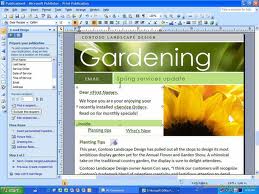
 ( Example of Webpage templates, from Google image, 21/03/2011 )

( Example of a complete Webpage after design, from Google image, 21/03/2011 )

Feel interesting..???? dont wait anymre~~just create and design your OWN WEBPAGE~~